Not Every Threat Looks Like a Virus Alert. Sometimes, It's Just an "Install" Button.
Most people picture a cyberattack as something dramatic — a flashing warning screen, a system lockdown, a ransom note appearing out of nowhere.
The reality is far quieter. And far more dangerous.
Some of the most damaging breaches in recent years didn’t start with a sophisticated exploit or a zero-day vulnerability. They started with something as mundane as an employee clicking an “Install” button on a piece of software that looked completely legitimate.
A free utility tool. A browser extension. A productivity app downloaded from a third-party site. Each one a potential entry point — and each one entirely preventable.
The Threat Hidden in Plain Sight
Unverified software is one of the most underestimated attack vectors in cybersecurity. Here’s why it’s so effective from an attacker’s perspective:
It bypasses technical defenses. Firewalls and antivirus tools are built to detect known threats. A brand-new malicious application — or a legitimate app bundled with a malicious payload — can slip through entirely undetected at the point of installation.
It exploits human trust. Employees aren’t malicious. They’re trying to do their jobs more efficiently. A tool that promises to speed up file transfers or simplify a workflow looks like a productivity win — not a security risk.
It’s scalable. Attackers don’t need to target your organization specifically. Malicious software can be distributed broadly, waiting for a single user in any organization to click install.
It requires no technical skill from the attacker. Once the software is installed, it does the work. Keyloggers capture credentials. Backdoors open remote access. Ransomware begins encrypting files. All triggered by one ordinary click.
What Are Admin Controls — and Why Do They Matter?
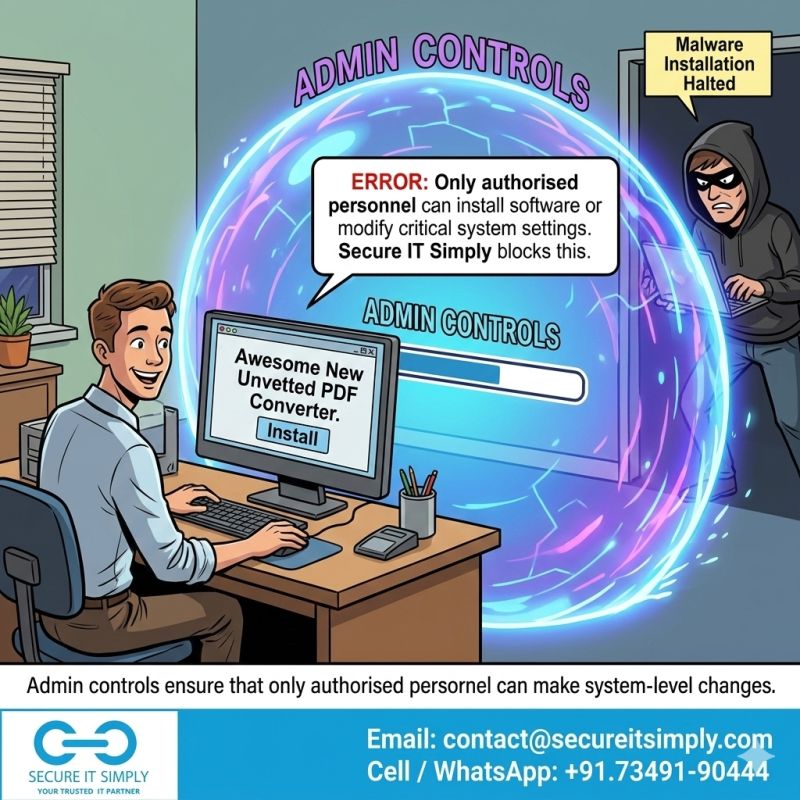
Admin controls — or administrative privilege controls — are policies and technical mechanisms that restrict who can install software, modify system configurations, or make changes to critical settings on a device or network.
In a properly configured environment, standard users simply cannot install unauthorized software. The system requires elevated permissions — permissions that only designated IT administrators hold.
This single control eliminates an enormous category of risk.
What Admin Controls Prevent:
- Unauthorized software installations — Employees cannot install apps, tools, or utilities without explicit IT approval
- Accidental malware execution — Drive-by downloads and malicious installers are blocked before they can run
- Shadow IT — Unauthorized applications operating outside your IT team’s visibility
- Insider threats — Limiting who can make system-level changes reduces exposure from both negligent and malicious insiders
- Privilege escalation attacks — Attackers who gain access to a standard user account cannot escalate their access without admin credentials
The Real Cost of Open Installation Policies
Many organizations — especially small and mid-sized businesses — operate with permissive installation policies because restriction feels like friction. Locking things down feels like slowing people down.
But consider the actual cost of a single uncontrolled install:
| Risk | Potential Impact |
|---|---|
| Ransomware deployment | Complete data lockout, operational shutdown, ransom demand |
| Spyware / keylogger | Credential theft, financial fraud, data exfiltration |
| Remote access trojan | Persistent attacker presence inside your network |
| Data breach via unsecured app | Regulatory fines, client notification, reputational damage |
| Shadow IT vulnerability | Unpatched apps with known vulnerabilities go undetected |
The friction of asking an employee to raise a software request takes minutes. Recovering from a ransomware attack takes weeks — and can cost far more than most organizations are prepared for.
Prevention vs. Reaction: A Fundamental Shift in Thinking
One of the most important mindset shifts in modern cybersecurity is moving from a reactive model to a preventive one.
Reactive security means deploying tools that detect and respond to threats after they’ve entered your environment. Antivirus software, SIEM systems, and incident response teams are all examples of reactive controls. They’re essential — but they’re never enough on their own.
Preventive security means building barriers that stop threats from entering in the first place. Admin controls sit squarely in this category. They don’t wait for a threat to be detected. They ensure that the conditions for many attacks simply cannot exist.
The most effective security postures layer both — but prevention always reduces the burden on detection and response.
How to Implement Admin Controls in Your Organization
Implementing admin controls doesn’t require a major overhaul. It starts with a few targeted, high-impact steps:
1. Audit Current Privilege Levels
Understand who in your organization currently has admin rights. In many businesses, this number is far higher than it should be. The principle of least privilege states that every user should have only the minimum access required to perform their role — nothing more.
2. Separate User and Admin Accounts
Employees with legitimate administrative duties should have two accounts — one standard account for day-to-day work and one elevated account used only when performing admin tasks. This limits exposure if a standard account is compromised.
3. Establish a Software Approval Process
Create a simple, documented process for software requests. Employees submit a request, IT evaluates the tool for security risks, and approved software is deployed centrally. This doesn’t have to be bureaucratic — a lightweight workflow can work for teams of any size.
4. Use Endpoint Management Tools
Modern endpoint management platforms (such as Microsoft Intune, Jamf, or similar solutions) allow IT teams to enforce installation restrictions, whitelist approved applications, and monitor endpoints centrally — without requiring manual configuration on every device.
5. Educate Your Team
Technical controls work best when paired with awareness. Employees who understand why installation restrictions exist are far more likely to follow the process — and far less likely to find workarounds.
Signs Your Organization Needs to Revisit Admin Controls
Not sure where your organization stands? Here are some indicators that your current access policies may be leaving you exposed:
- Most or all employees have local administrator rights on their machines
- There is no formal process for requesting or approving new software
- IT has limited visibility into what applications are installed across devices
- Employees regularly install browser extensions, plugins, or utilities independently
- Your organization has experienced incidents involving unauthorized software in the past
If any of these sound familiar, it’s time to act — before an attacker does.
The Bottom Line
Cybersecurity isn’t only about the threats you can see. It’s about closing the doors that shouldn’t be open in the first place.
Admin controls are not about distrusting your employees. They’re about ensuring that a single click — made with completely good intentions — cannot expose your entire organization to risk. They are one of the most fundamental, cost-effective, and impactful controls a business can implement.
No unauthorized installs. No risky system changes. Stronger control, safer business.
Because the best security incident is the one that never happens.
Take Control Before Someone Else Does
At SecureITSimply, we help businesses implement the access controls, endpoint policies, and security frameworks that form the foundation of a resilient cybersecurity posture.
Whether you’re starting from scratch or looking to audit and strengthen what you already have, our team brings clarity, practicality, and real-world expertise to every engagement.
👉 If your organization still allows open installations, it might be time to rethink your controls. Let’s talk.